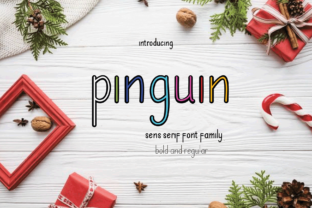
Pinguin Font: A Fresh Typeface for Small Business Branding
It started with a simple stack of brown kraft boxes and a feeling that something was missing. I run a small online shop selling handmade soy candles, and while the scent profiles were perfect and the wax quality was top-notch, my packaging felt a bit generic. I had been using a standard system font for my labels, and it just didn't tell the story of the care I put into every jar. That's when I stumbled upon Pinguin, a quirky and fun sans serif font that felt both familiar and fresh. It was exactly the spark my brand identity needed to turn a simple design idea into a true eye-catcher.
Choosing the right typeface is often the difference between a customer scrolling past your social media graphics or stopping to take a closer look. For entrepreneurs and boutique owners, typography isn't just about making words legible; it is about setting a mood. Pinguin brings a playful yet polished energy that works beautifully for brands wanting to appear approachable without sacrificing professionalism. Unlike stiff corporate fonts, this creative font has character. The rounded edges and unique letterforms give it a friendly personality, making it an excellent choice for businesses in the lifestyle, beauty, food, and craft sectors.
Transforming Everyday Business Materials
The moment I swapped my old label text for Pinguin, the entire vibe of my product shifted. Suddenly, the candle jars looked like they belonged on a trendy shelf in a high-end boutique rather than just sitting in a storage bin. This is the power of a well-chosen display font. It acts as the visual voice of your company. When customers receive a package with a thank-you card printed in Pinguin, they immediately sense a brand that is modern, thoughtful, and detail-oriented.
This font shines brightest when used for headlines, short phrases, and logos. Because of its distinct style, it grabs attention quickly, making it perfect for:
- Product Labels: Whether it's a skincare serum bottle or a jam jar, Pinguin makes the product name pop against the background.
- Packaging Design: Use it on bakery boxes, shipping stickers, or ribbon tags to create a cohesive unboxing experience.
- Social Media Graphics: Instagram stories and Pinterest pins benefit from the bold, readable nature of this sans serif font.
- Menus and Flyers: Cafés and local shops can use it to highlight daily specials or event details with a touch of whimsy.
However, readability is key. While Pinguin is fantastic for titles and decorative accents, it is best paired with a cleaner, more neutral typeface for long paragraphs of text. Imagine using Pinguin for your café menu headers to list the coffee blends, but switching to a simple, clean sans serif font for the descriptions of ingredients. This balance ensures your design remains accessible while still maintaining that unique brand flair.
Building Trust Through Visual Consistency
One of the biggest challenges for small business owners is maintaining consistency across different platforms. Your website banners, email newsletters, and physical merchandise all need to feel like they come from the same family. Typography is the glue that holds these elements together. By adopting Pinguin as your primary display typeface, you create a recognizable visual thread that customers begin to associate with your brand.
When a potential client sees your logo on a business card and then recognizes the same font on your digital ads, it builds a sense of reliability. It tells them that you are established and that you care about your presentation. In the world of e-commerce, where customers cannot touch or smell the product before buying, these visual cues are vital. A polished, consistent look signals trustworthiness. It suggests that if you pay this much attention to your fonts, you likely pay equal attention to the quality of your goods.
Smart Font Pairing Strategies
To get the most out of Pinguin, consider how it interacts with other styles. Since it is a quirky sans serif, it pairs wonderfully with contrasting fonts. For a modern, clean look, try combining it with a geometric sans serif font for body text. This keeps the design feeling current and easy to read on mobile screens.
If you want to lean into the handmade aesthetic, Pinguin looks charming next to a delicate script font or a handwritten font. This combination works exceptionally well for wedding invitations, greeting cards, or artisanal food packaging. The structure of Pinguin grounds the flowy nature of a script, creating a balanced editorial design that feels both professional and personal. Avoid pairing it with another highly decorative serif font, as the competition between the two styles can make your design look cluttered and hard to decipher.
Practical Tips for Implementation
Before diving into your redesign project, there are a few practical steps to ensure you are using the font correctly. First, always check the included styles and file formats. Does the font family come with multiple weights? Having access to bold and regular versions gives you flexibility when designing hierarchy in your layouts. Also, verify if the font includes alternates or ligatures. These special characters can add unique touches to your logo design, allowing you to customize specific letters to make your mark truly one-of-a-kind.
Multilingual support is another factor to consider if you plan to sell internationally. Ensuring your chosen typeface supports the necessary character sets will save you headaches down the road when expanding your market. Finally, and perhaps most importantly, review the commercial font licensing. As a business owner, you must ensure your license covers all your intended uses, whether that is printing on physical merchandise, embedding in web design, or including in digital templates for clients. Using a properly licensed premium font protects your business and respects the work of the type designer.
Upgrading your brand visuals doesn't require a massive budget or a complete rebrand. Sometimes, it just takes finding the right tool. Pinguin offers that perfect blend of fun and function, allowing small businesses to stand out in a crowded marketplace. By thoughtfully applying this typeface to your packaging, social media, and print materials, you can elevate your brand perception and connect more deeply with your audience. It is a reminder that in design, the smallest details often make the biggest impact.